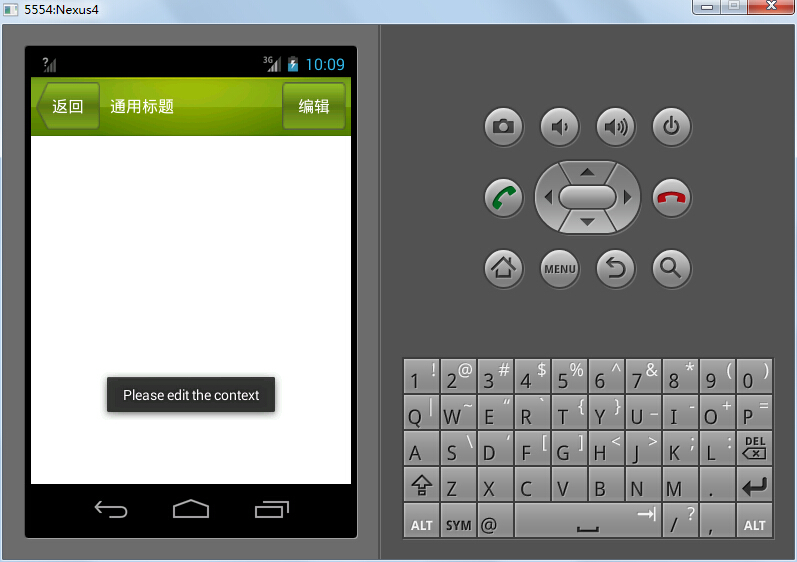
In Android development, you may need custom layouts. For example, apps often require a common title bar. However, the built-in options may not meet your needs, so you have to implement one yourself. Since an app typically contains multiple Activities, it is common practice to define a CommonTitle for better reusability. This article demonstrates a custom CommonTitle implementation.
Create a new layout
1
2
3
<!--?xml version="1.0" encoding="utf-8"?--> <button> </button>Create a new CommonTitle class extending LinearLayout
 1
 2
 3
 4
 5
 6
 7
 8
 9
10
11
12
13
14
15
16
17
18
19
20
21
22
23
24
25
26
27
28
29
30
31
32
33
34
35
package com.example.uicustomviews; import android.app.Activity; import android.content.Context; import android.util.AttributeSet; import android.view.LayoutInflater; import android.view.View; import android.widget.Button; import android.widget.LinearLayout; import android.widget.Toast; public class CommonTitle extends LinearLayout { public CommonTitle(Context context, AttributeSet attrs) { super(context, attrs); LayoutInflater.from(context).inflate(R.layout.commontitle, this); Button backButton = (Button)findViewById(R.id.backButton); backButton.setOnClickListener(new OnClickListener() { @Override public void onClick(View view) { // TODO Auto-generated method stub ((Activity)getContext()).finish(); } }); Button editButton = (Button)findViewById(R.id.editButton); editButton.setOnClickListener(new OnClickListener() { @Override public void onClick(View view) { // TODO Auto-generated method stub Toast.makeText(getContext(), "Please edit the context", Toast.LENGTH_SHORT).show(); } }); } }Include your custom CommonTitle in the Activity that needs it
1<!-- Your Activity layout XML -->
The result looks like this: