Cesium Chinese Website: http://cesiumcn.org/ | China Fast Access: http://cesium.coinidea.com/
CesiumJS supports streaming and visualizing high-resolution terrain along with water-related effects for oceans, lakes, and rivers. View mountain peaks, valleys, and other terrain features while embracing the 3D digital globe. Stream your own tiled terrain data or high-resolution managed terrain such as Cesium World Terrain using Cesium ion.
Quick Start
Open the Sandcastle Hello World example. By default, the globe is a WGS84 ellipsoid. Specify a different terrain provider by passing the terrainProvider option to Viewer. Let’s use Cesium World Terrain:
| |
NOTE: Create a Cesium account. This tutorial uses terrain provided by Cesium ion. Create an account to obtain an access token for using terrain in this tutorial. Sign up here. The example code above will automatically update with your token. If you already have an account, sign in.
After modifying the example, press F8 to run it. Zoom to a mountainous area, hold the middle mouse button and drag to tilt to a horizon view. Here is what Mount Everest looks like:
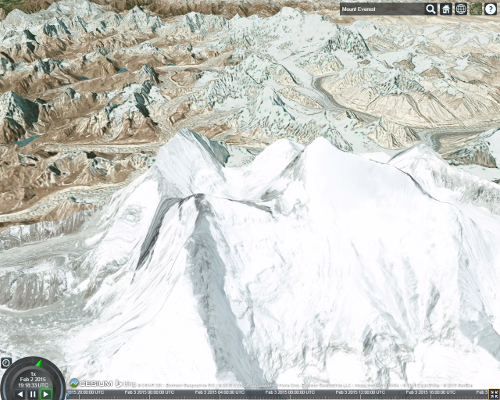
As we zoom closer, CesiumJS fetches higher resolution terrain based on which parts of the globe are visible and how far away they are.
Terrain and imagery are handled separately, and any imagery provider can be used with any terrain provider. See the Imagery Layers Tutorial for managing imagery.
Enabling Terrain Lighting and Water Effects
Cesium World Terrain also includes terrain lighting data and coastline data needed for water effects. By default, this data is not sent along with terrain tiles. To enable terrain lighting, set requestVertexNormals to true and turn on global lighting.
| |
Below is the same view of Mount Everest with terrain lighting enabled based on sun position.

Enable water effects in a similar way using requestWaterMask:
| |
Zoom to an area with water to see the effect. Here is the San Francisco Bay:
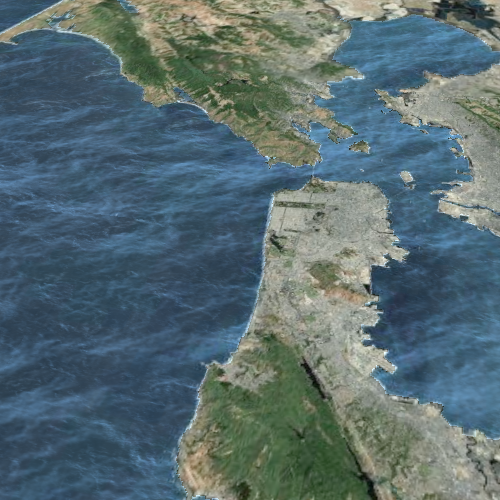
Over time, waves ripple and bright specular reflections from the sun and moon appear. Customize the water effect using Globe.oceanNormalMapUrl for wave creation. Changing the imagery provider also affects the appearance of the water, as the water color blends with the underlying imagery.
See the Sandcastle Terrain example to explore some interesting terrain and water effect areas.
Terrain Ready for Streaming
Cesium World Terrain: High-resolution world terrain with extended support for terrain lighting and water effects. Cesium World Terrain supports online access via Cesium ion and paid downloads for offline access. Adding it to your Cesium application will quickly improve terrain visualization. Cesium World Terrain is also available via on-premise deployment.
Terrain Providers
Cesium supports several methods for requesting terrain based on terrain providers. Most terrain providers use REST interfaces over HTTP to request terrain tiles. Terrain providers differ based on the format of the request and how the terrain data is organized. CesiumJS supports the following terrain providers:
- CesiumTerrainProvider: Supports quantized-mesh terrain tiles optimized for terrain streaming. Compatible with terrain served by Cesium ion and output from the 3D tiling pipeline.
- GoogleEarthEnterpriseTerrainProvider: Supports heightmap terrain generated by your Google Earth Enterprise server.
- VRTheWorldTerrainProvider: Supports heightmap terrain requested from VT MAK VR-TheWorld Server.
- EllipsoidTerrainProvider: Procedurally creates the surface of an ellipsoid. Lacks realistic terrain appearance but does not request data from a server.
Terrain provider construction is similar to imagery providers and typically includes the terrain server URL and an optional proxy if the server does not support Cross-Origin Resource Sharing (CORS).
Resources
View the Terrain example in Sandcastle and reference documentation for all terrain providers.
Cesium Chinese Website QQ Group: 807482793
Cesium Chinese Website: http://cesiumcn.org/ | China Fast Access: http://cesium.coinidea.com/