Our team sometimes describes Cesium as a 3D game engine for real-world data. However, working with real-world data is much more difficult than working with typical video game assets, because real data can be incredibly high-resolution and requires precise visualization. Fortunately, Cesium has collaborated with the open-source community to develop 3D Tiles, an open specification for streaming massive heterogeneous 3D geospatial datasets.
Using streaming technology conceptually similar to Cesium’s terrain and imagery, 3D Tiles makes it possible to view enormous models that would otherwise be impossible to interactively view, including building datasets, CAD (or BIM) models, point clouds, and photogrammetry models.
- The 3D Tiles Inspector is a debugging tool that provides the ability to look under the hood.
Here are some demos showcasing different 3D Tiles formats:
In our application, we’ll use Cesium3DTileset to add realism to our visualization by displaying full 3D models of all buildings in New York! This NYC tileset is hosted on Cesium Ion, and we can add it using IonResource.fromAssetId:
| |
You may notice that the buildings are not correctly positioned on the ground plane. Fortunately, this is easy to fix. We can adjust the tileset’s position by modifying the model matrix (modelMatrix).
We can find the current offset of the model modelMatrix from the ground by converting the tileset’s bounding sphere to Cartographic, then adding the desired offset and resetting the model matrix.
| |
Now we have 1.1 million building models streaming in our scene.
3D Tiles also allows us to adjust our styling using the 3D Tiles styling language. A 3D Tiles style defines expressions for evaluating the color (RGB and transparency) and display of a Cesium3DTileFeature, which is part of the tileset, such as an individual building in the city. Styles are typically based on feature properties stored in the tile’s batch table. Feature properties can be height, name, coordinates, construction date, or anything else built into the tileset asset. Styles are defined in JSON, and expressions are written in a small subset of JavaScript designed for styling. Additionally, the styling language provides a set of built-in functions to support common math operations.
An example of Cesium3DTileStyle:
| |
The above code makes our NYC tileset white and always visible. To actually set the tileset’s style, we set city.style:
| |

We can also define as many styles as we like. For example, making the buildings transparent:
| |
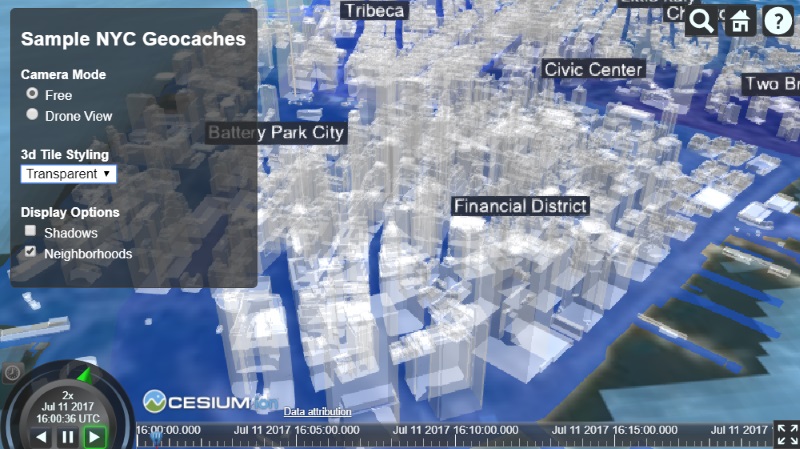
Applying the same style to every feature in our tileset is just scratching the surface. We can also use properties specific to each feature to determine styling. Here’s an example of coloring buildings based on their height:
| |

To switch between styles, we can add more code to listen to HTML input:
| |
For more examples of 3D Tiles, how to use and adjust styles, check out the 3D Tiles sandcastle demos.
3D Tiles examples:
If you have data and need help converting it to 3D Tiles, stay tuned for updates on the Cesium Ion platform! Subscribe for updates here.
Cesium Chinese Community QQ Group: 807482793
Original link: http://cesiumcn.org/topic/163.html | China fast access: http://cesium.coinidea.com/topic/163.html