Cesium ion is a platform that provides tiled maps and 3D geospatial data. Cesium ion supports adding data to your own CesiumJS applications. Below we will use Sentinel-2 2D imagery and Cesium World Terrain, both of which require ion support.
Note When using Cesium, if you haven’t applied for an ion account and are using Cesium’s default data sources instead of your own, the bottom of the viewer will often display a line of small English text. The message basically says you need to apply for an access token.
- First, you need to register for a free Cesium ion account.
- Go to https://cesium.com/ion/ and register a new account.
- Click “Access Token” to navigate to the Access Tokens page.
- Select the Default access token and copy the contents.
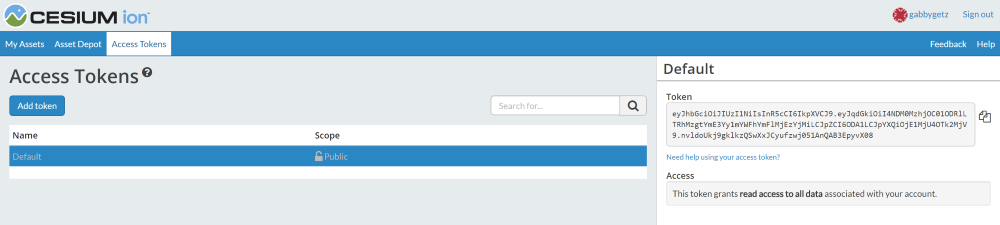
When creating a Cesium Viewer, simply set the access token to your own:
| |
With this, you can freely access various data sources provided by Cesium ion.
More questions can be found at Getting Started with Cesium ion
Cesium Chinese Community QQ Group: 807482793
Original link: http://cesiumcn.org/topic/153.html | China fast access: http://cesium.coinidea.com/topic/153.html