TL;DR
In two days, I shipped an open-source, cross-platform desktop AI English-speaking tutor: EchoWise.
Built end-to-end with Vibe Coding / Agentic Engineering.
Why EchoWise
Almost every English-learning app on the market teaches you to study English: flashcards, drills, scores, leaderboards. But what I actually needed when I was learning English wasn’t more learning — it was more using.
Stop studying English. Start using English.
EchoWise is built on the opposite philosophy:
- Communication before perfection — Imperfect English that connects beats perfect grammar that stays silent
- Relationship before knowledge — Polite stranger on Day 1, easy old friend by Day 30. Your AI companion’s tone evolves naturally with the day count
- Gentle nudges, never interruptions — The AI never lectures mid-reply. Scores sit quietly in the corner of your bubble — one glance when you want them
- Local-first — Every conversation, recording, and AI voice playback stays on your machine. Nothing is uploaded
What EchoWise actually does
The whole product revolves around one core idea: a companion that grows with you.
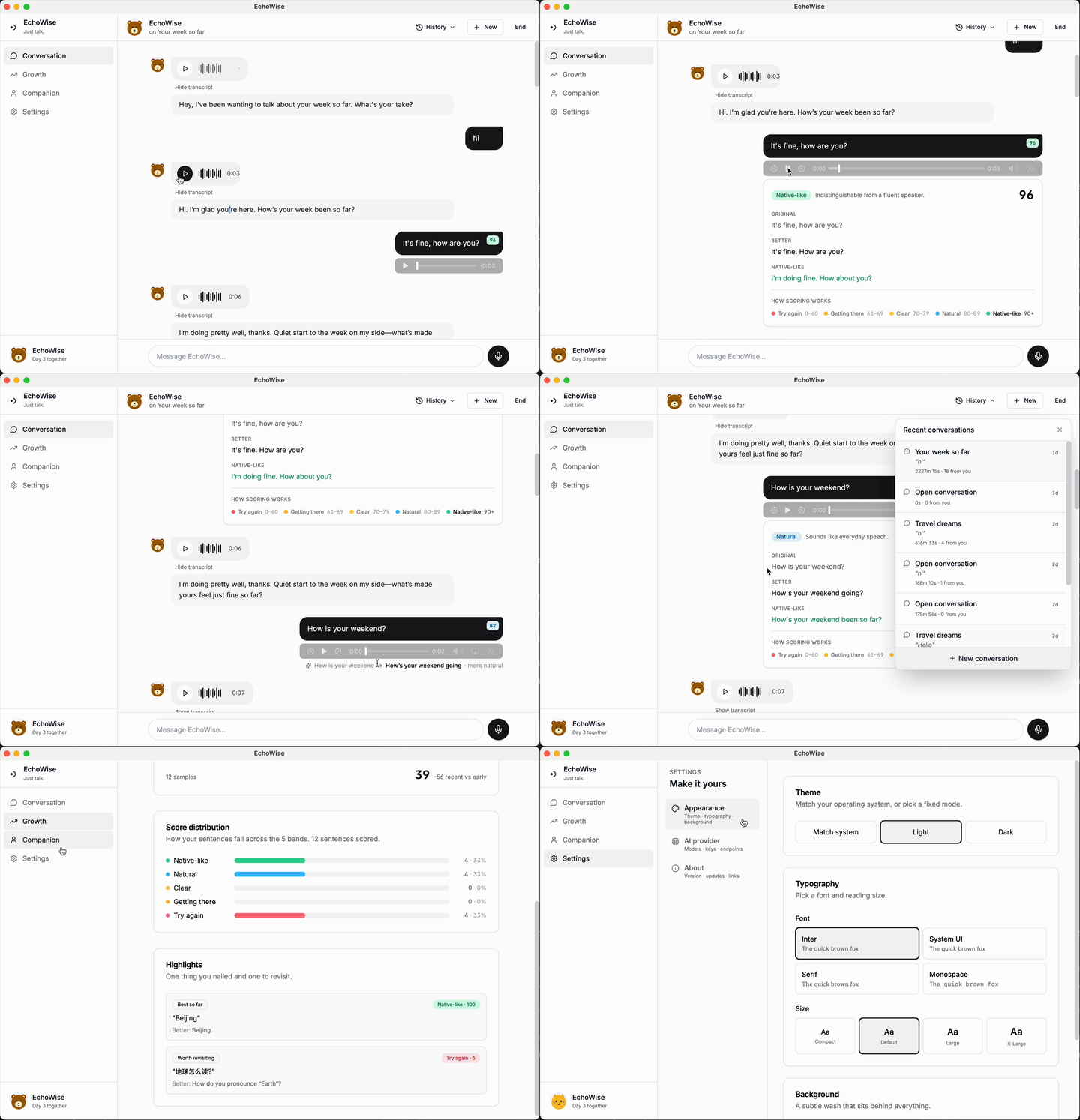
🗣️ A companion that grows
You give them a name, pick an avatar, choose a voice, write a persona. EchoWise tracks the Day count and maps the relationship into 5 tiers: Stranger → Acquaintance → Familiar → Friend → Old friend. The AI’s tone follows naturally — polite stranger on Day 1, the kind of old friend who teases you and remembers what you said by Day 30.
🎙️ Voice-first conversation
Hold the mic to record, release to transcribe; type when you can’t talk. The AI’s reply comes back as a voice-message-style bubble — tap the waveform to play. Don’t want to listen? Click “Show transcript” for the text. The whole flow feels like a normal messaging app, not a drill exercise.
💡 Coaching that never interrupts
The most annoying anti-pattern is an AI that breaks mid-conversation to lecture you about “you should have used the present perfect here.” EchoWise refuses to do that.
- The AI never mixes grammar lectures into its replies
- After every sentence you say, a 1–100 score chip appears in the corner of your bubble, in 5 color bands:
- 🔴 Try again (< 50)
- 🟠 Getting there (50–59)
- 🟡 Clear (60–69)
- 🟢 Natural (70–89)
- ⭐ Native-like (90+)
- Tap the chip to see original / better / native-like + a short note
- Don’t tap? Keep talking. It never interrupts you
📈 Growth that actually means something
Not “how many words you reviewed today,” but:
- Confidence trend — rolling average of your last 5 sentences, updates as you talk
- 5-band distribution — where do your sentences cluster
- Auto-picked “best so far” and “worth revisiting”
Open the Growth view and see at a glance that you’re getting better. That positive feedback loop beats streak-counting any day.
🎨 Full appearance customization
Theme (system / light / dark), 4 fonts, 4 sizes, 6 preset gradient backgrounds — or upload your own image. Each companion can have their own avatar and background, too.
🔌 Multi-provider
OpenAI / Azure OpenAI in one click.
Defaults to gpt-5 + gpt-4o-transcribe + gpt-4o-mini-tts.
TTS voice instructions adapt dynamically to the companion’s persona —
a lively companion gets a more energetic voice, a calm one gets a quieter delivery.
💾 Fully local
SQLite database + filesystem. Every conversation, every recording you made, every AI voice clip — lives on your machine forever, never uploaded to any server.
About the “two days”
The entire build was a Vibe Coding / Agentic Engineering workflow: I focused on product decisions and architectural judgment, the AI handled implementation and grind work.
My job:
- Decide what features ship, how the UX should flow, how many tiers in the relationship arc
- Judge whether the architecture holds, whether an abstraction is worth it, where bugs actually live
- Write the PRD, iterate on UX, review PRs
The AI’s job:
- Write React components, call Tauri APIs, write unit tests
- Tune Vite / Cargo / Tailwind config
- Edit GitHub Actions workflows, fix CI failures
- Propose improvements, catch my mistakes
After two days, this is what the product looked like:
| Metric | Number |
|---|---|
| Application code (TS + TSX + Rust) | ~4,571 lines |
| Unit test code | ~3,405 lines |
| Unit tests | 281 |
| Line coverage | 94.5% |
| Cross-platform CI/CD | macOS + Windows, tag-triggered releases |
| Auto-update | tauri-plugin-updater with signature verification |
Try EchoWise
- GitHub: https://github.com/hujiulin/EchoWise
- Download: Releases page has macOS
.dmgand Windows.msi - Setup: Built-in OpenAI and Azure OpenAI presets — drop in your own API key and you’re talking
macOS note: the first time you open it you’ll see “Apple could not verify…”. That’s because I haven’t paid for an Apple Developer ID ($99/year) for notarization. Open System Settings → Privacy & Security → scroll to the bottom → click Open Anyway once, and you’re done forever. Full steps are in the README.
If you enjoy it, a ⭐ on the EchoWise repo is very welcome — it helps more people find it. Feedback, bugs, ideas — open an Issue or PR on GitHub.